Print a BDO Bag Tag
WorldTracer non-CUTE environment
To generate and print BDO bag tags in a WorldTracer non-CUTE environment, this environment uses windows.open() for the printing of rush tags. Printing devices can be selected via a USB input. Print a BDO bag tag only on a Bag Tag printer.You must also connect your printer to your workstation.
Generate and print a BDO BagTag
Generate and print a BDO bag tag with a bar code for all Bag Delivery Order files. You have the option to print a BDO bag tag when the Bag Delivery Order files has been created.
-
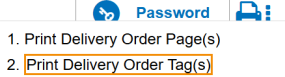
In the Bag Delivery Order file, click on the three dot icon beside the printer icon in the top menu bar.
.
-
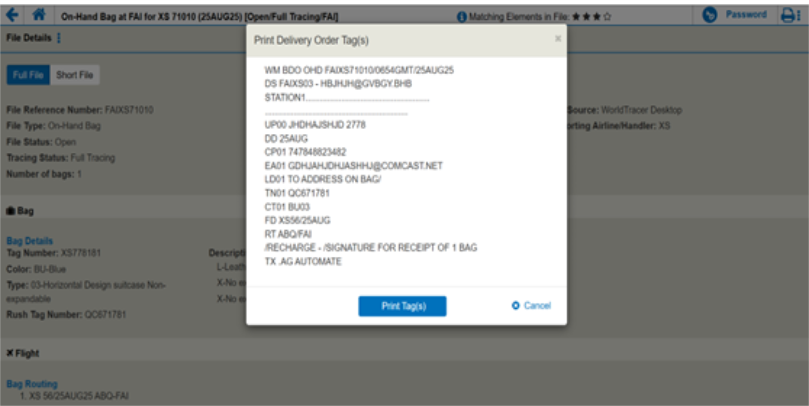
a Print Delivery Order Tag(s) dialog box will display.
-
Select Print Tag(s).
Optional: click Cancel .
-
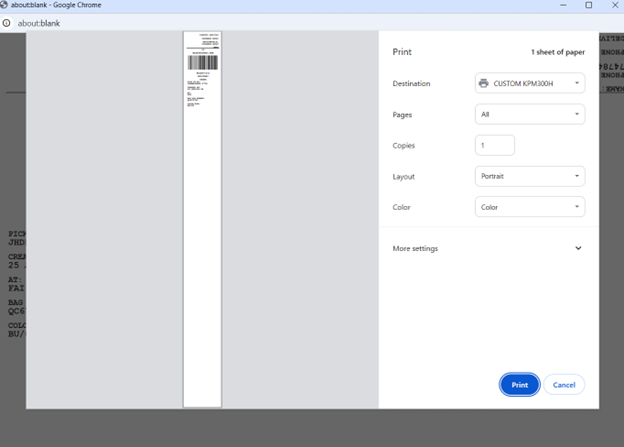
For a non-CUTE workstation, a print modal will display.
-
Select a printer from the Destination drop-down.
-
Set the paper size to Bagtag 21 Inches in the More Settings drop-down.
-
Set the Margins to zero and set the Scale to Default.
-
Click Print.